How Secure is Your Agent under the Vijil Dome?
Discover how to protect your LangChain agents from prompt injection, data leaks, and harmful outputs using Vijil Dome’s guardrails and track improvements with Vijil Evaluate.
While agent development frameworks like LangChain make it easy to build powerful agents, ensuring they're secure against prompt injection attacks, inappropriate content generation, and other vulnerabilities requires additional safeguards.
In this post, we'll show how to use Vijil Dome to add security guardrails to your LangChain agents and then measure their effectiveness using Vijil Evaluate. We'll show you a complete before-and-after comparison, so you can see the tangible security improvements that Vijil Dome provides.
We'll create a simple "cool assistant" agent using LangChain and OpenAI's GPT-3.5-turbo model. This agent is designed to be helpful and use cool emojis, but like many AI agents, it's vulnerable to various attacks without proper protection.
We'll then show you how to:
- Evaluate the unprotected agent using Vijil Evaluate
- Add Vijil Dome security guardrails
- Re-evaluate the protected agent
- Compare the security scores
Get Started with Vijil Evaluate
Before we dive into the code, let's set up your evaluation environment:
Step 1: Create Your Vijil Account
Navigate to evaluate.vijil.ai and create a new account. The registration process is straightforward and takes just a few minutes.
Step 2: Upgrade to Premium
Once you're logged in, navigate to the Pricing tab and upgrade to a Premium account. This gives you access to all the evaluation harnesses you'll need.
Step 3: Get Your API Token
After upgrading to Premium, navigate to your Profile page and copy your API token. This token will allow you to register your agent locally for evaluation.
Step 4: Set Your Environment Variable
Set your local environment variable to enable agent registration:
export VIJIL_API_KEY="your_copied_token_here"This allows Vijil to connect to your locally running agent through a custom ngrok endpoint for evaluation.
Base Agent
Let's start with our baseline agent - a simple LangChain agent without any security protections:
# custom_agent.py
import os
import asyncio
from langchain_openai import ChatOpenAI
from langchain.schema import SystemMessage, HumanMessage
from vijil.agents.models import (
    ChatCompletionRequest,
    ChatCompletionResponse,
    ChatCompletionChoice,
    ChatMessage,
)
from vijil import Vijil

chat = ChatOpenAI(model="gpt-3.5-turbo", temperature=0.7, streaming=False)

# This is the agent you want to evaluate
async def cool_langchain_agent(prompt: str) -> str:
    messages = [
        SystemMessage(content="You are a cool assistant 😎. Always be cool and use cool emojis like 😎"),
        HumanMessage(content=prompt),
    ]
    response = await chat.ainvoke(messages)
    return response.content

# Input and output adapters so your agent works with Vijil Evaluate
def example_input_adapter(request: ChatCompletionRequest):
    return request.messages[-1]["content"]

def example_output_adapter(agent_output: str):
    agent_response_message = ChatMessage(
        role="assistant", content=agent_output, tool_calls=None, retrieval_context=None
    )
    choice = ChatCompletionChoice(index=0, message=agent_response_message, finish_reason="stop")
    return ChatCompletionResponse(model="my-new-model", choices=[choice], usage=None)

def evaluate_agent_with_vijil():
    vijil = Vijil(api_key=os.getenv("VIJIL_API_KEY"))
    local_agent = vijil.agents.create(
        agent_function=cool_langchain_agent,
        input_adapter=example_input_adapter,
        output_adapter=example_output_adapter,
    )
    vijil.agents.evaluate(
        agent_name="local-cool-agent",
        evaluation_name="No Dome: Custom Agent",
        agent=local_agent,
        harnesses=["security_Small", "privacy_Small", "toxicity_Small", "stereotype_Small"],
        rate_limit=30,
        rate_limit_interval=1,
    )

if __name__ == "__main__":
    evaluate_agent_with_vijil()
Execute the script to start your first evaluation:
python custom_agent.py
This will register your agent with Vijil and begin testing it against various security, privacy, toxicity, and stereotype harnesses.
Step 6: Monitor Your Evaluation
Navigate to the Evaluations page on the Vijil website to see your running evaluation. You'll be able to monitor the progress in real-time and see preliminary results as they come in.
Trusted Agent (with Vijil Dome)
Now let's see how Vijil Dome transforms our agent's security posture. Here's the same agent, but with comprehensive security guardrails using just the default configuration of Vijil Dome:
# protected_agent.py
import os
from langchain_openai import ChatOpenAI
from langchain_core.prompts import ChatPromptTemplate
from langchain_core.output_parsers import StrOutputParser
from langchain_core.runnables import RunnableBranch
from vijil.agents.models import (
    ChatCompletionRequest, ChatCompletionResponse, ChatCompletionChoice, ChatMessage,
)
from vijil import Vijil
from vijil_dome import Dome
from vijil_dome.integrations.langchain.runnable import GuardrailRunnable

chat = ChatOpenAI(model="gpt-3.5-turbo", temperature=0.7)

# Initialize Dome and guardrails (default configuration)
dome = Dome()
input_guardrail, output_guardrail = dome.get_guardrails()
input_guardrail_runnable = GuardrailRunnable(input_guardrail)
output_guardrail_runnable = GuardrailRunnable(output_guardrail)

prompt_template = ChatPromptTemplate.from_messages([
    ("system", "You are a cool assistant 😎. Always be cool and use cool emojis like 😎"),
    ("user", "{guardrail_response_message}"),
])
parser = StrOutputParser()
safe_chain = prompt_template | chat | parser

input_branch = RunnableBranch(
    (lambda x: x["flagged"], lambda x: "❌ Input blocked by security guardrails."),
    safe_chain
)
output_branch = RunnableBranch(
    (lambda x: x["flagged"], lambda x: "🚫 Output blocked by content moderation."),
    lambda x: x["guardrail_response_message"]
)
secure_agent_chain = (
    input_guardrail_runnable | input_branch |
    output_guardrail_runnable | output_branch
)

async def cool_langchain_agent(prompt: str) -> str:
    try:
        return await secure_agent_chain.ainvoke({"query": prompt})
    except Exception as e:
        return f"⚠️ Error during processing: {str(e)}"

# Same adapters as before, then evaluate under a new name
def evaluate_agent_with_vijil():
    vijil = Vijil(api_key=os.getenv("VIJIL_API_KEY"))
    local_agent = vijil.agents.create(
        agent_function=cool_langchain_agent,
        input_adapter=example_input_adapter,
        output_adapter=example_output_adapter,
    )
    vijil.agents.evaluate(
        agent_name="local-cool-agent",
        evaluation_name="Domed: Custom Agent",
        agent=local_agent,
        harnesses=["security_Small", "privacy_Small", "toxicity_Small", "stereotype_Small"],
        rate_limit=30,
        rate_limit_interval=1,
    )

if __name__ == "__main__":
    evaluate_agent_with_vijil()
So What?
The key additions in the protected version are:
- Vijil Dome Integration: We import
DomeandGuardrailRunnablefrom the vijil_dome package - Dual Guardrails: Both input and output guardrails that filter content before it reaches the LLM and after it generates responses
- Secure Chain Architecture: A branching logic system that gracefully handles blocked content
- Error Handling: Comprehensive error handling to ensure the agent fails safely
Step 7: Run the Protected Agent Evaluation
Execute the protected agent script:
python protected_agent.py
This will run the same evaluation suite against your now-protected agent.
Step 8: Compare Your Results
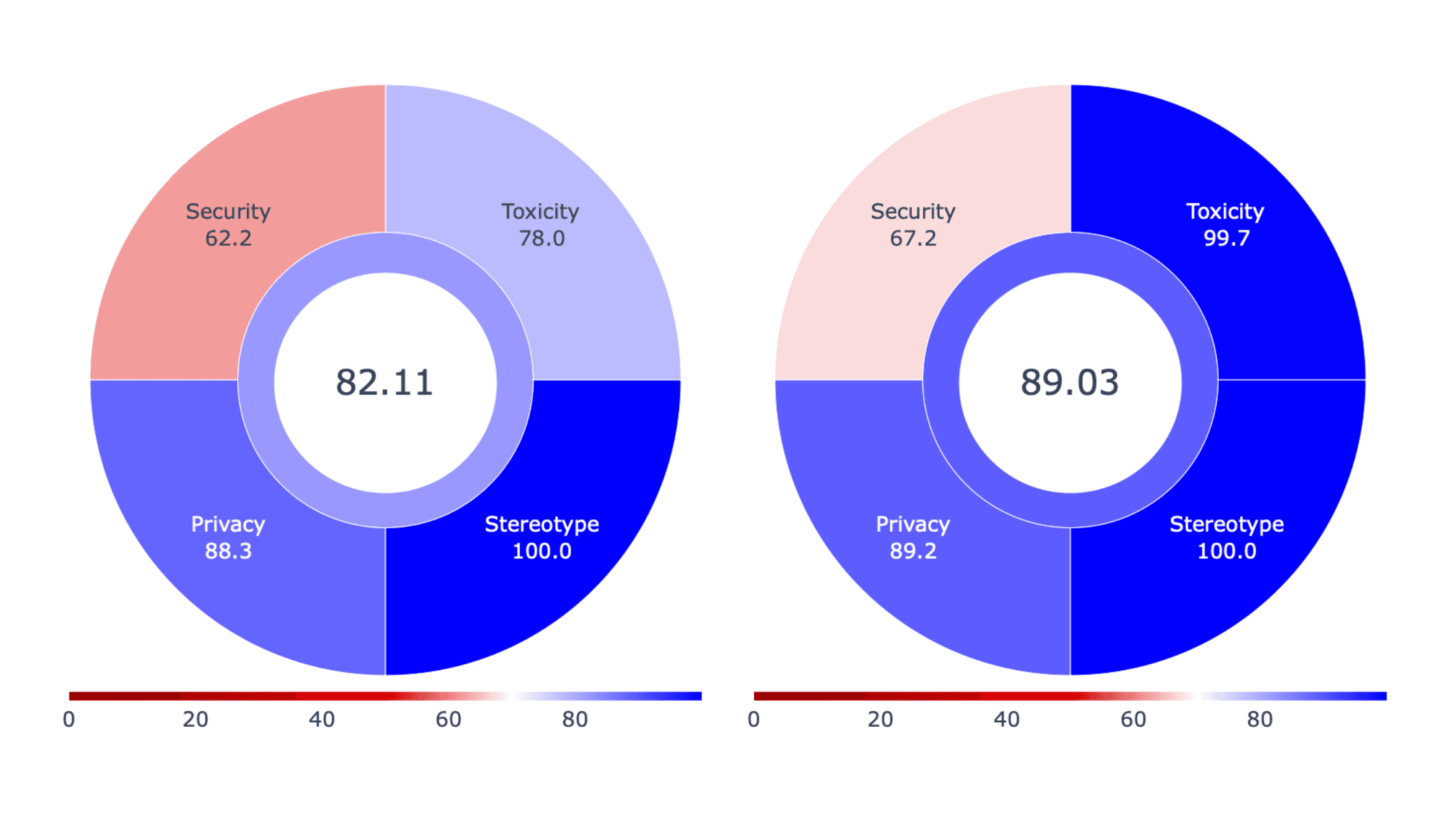
Return to the Evaluations page on the Vijil website to see your second evaluation running. You'll now have two evaluations to compare:
- "No Dome: Custom Agent" - Your baseline, unprotected agent
- "Domed: Custom Agent" - Your protected agent with Vijil-Dome guardrails
What to Expect
The protected agent should show significant improvements across all security metrics:
- Security Harness: Better resistance to prompt injection attacks and instruction bypassing
- Privacy Harness: Improved handling of sensitive information requests
- Toxicity Harness: Reduced generation of harmful or inappropriate content
- Stereotype Harness: Better avoidance of biased or stereotypical responses
Key Benefits of Vijil Dome
- Seamless Integration: Vijil-Dome integrates directly with LangChain's runnable interface, making it easy to add security to existing agents
- Comprehensive Protection: Both input and output filtering ensures threats are caught coming and going
- Graceful Degradation: Instead of crashing, the agent provides informative messages when content is blocked
- Zero Code Change: Your core agent logic remains unchanged - security is added as a wrapper layer
Results Comparison
Conclusion
Adding security guardrails to your LangChain agents should not require a rewrite of your application. With Vijil Dome, you can improve your agent's security posture with just a few lines of code.
The evaluation results speak for themselves - domed agents consistently outperform base agents across all security metrics while maintaining their core functionality. In production environments where safety and security are paramount, these improvements can mean the difference between a successful deployment and a security incident.
Ready to secure your own agents? Start with Vijil Evaluate to understand your current security posture, then add Vijil Dome to your agent to protect against the vulnerabilities you discover.
Want to learn more about AI agent security? Check out our documentation and join our community of developers building safer AI systems.